Does your app need a redesign for iPhone Duo?

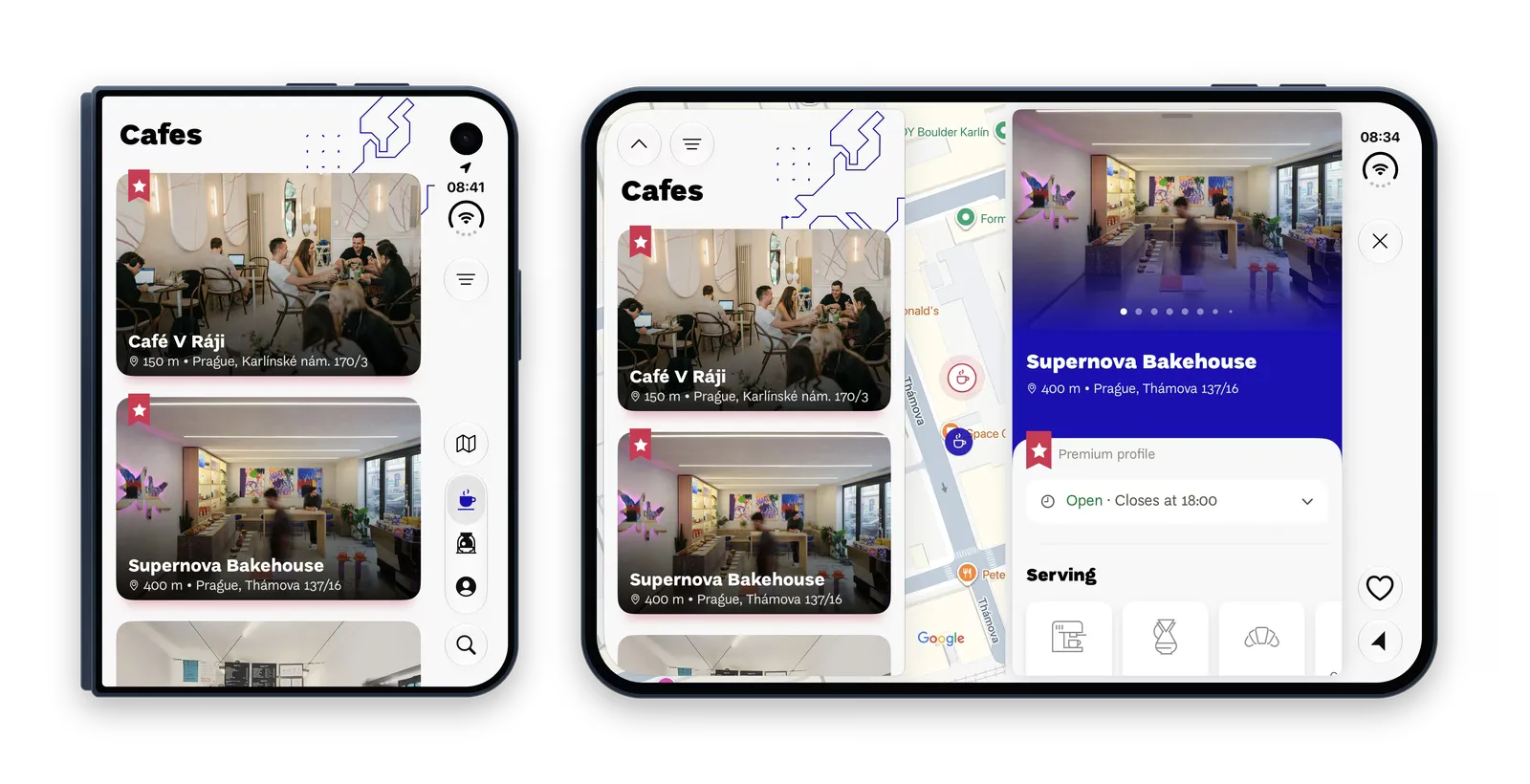
Short answer: probably not, but a few areas deserve your attention. With its big screen, iPhone Duo opens up new potential for your mobile app, whether you rely on text, maps or photos. Here are some tips from Cookielabbers, who had the European Coffee Trip (ECT) app ready for iPhone Duo from day one.
European Coffee Trip helps people find specialty cafés and roasters across Europe. More than 250,000 people used it on iPhone in the past year, and it is rated 4.9 in the App Store. Version 2.0, designed for both of the Duo’s displays, was in the App Store on 23 October 2026, the day iPhone Duo went on sale.
What makes iPhone Duo different from other foldables?
You may say foldable smartphones have been with us for a few years, and you would be completely right. Apple didn’t invent the foldable phone – Samsung’s first Galaxy Fold came out in 2019. And people do use them: in one of the Android apps we work on, one in 12 active users has a foldable phone. What is different with Apple is how much the system does for you.
Along with the iPhone Duo announcement, Apple also published a design guide for it. On top of that, iOS moves standard menus to the side of the screen on the closed phone, and standard layouts work around the fold when the phone is half open. If your app uses the Apple standards, iOS does a lot of the work for you.
These guidelines mean mobile app developers don’t have to guess what to do or what an app will look like on different screen sizes. Apple put together a list of best practices, making everyone’s life easier. They definitely helped us with the ECT app, and they will help your developers too. But one thing is important to say: most apps don’t need a big redesign for iPhone Duo.
When you don’t need a redesign for iPhone Duo (and when you do)
If you used Apple’s standard building blocks, your app should be responsive for different screen sizes and therefore ready for iPhone Duo. A quick test: does your app work well on both iPhone and iPad? Then you’re most probably fine.
We tested this approach on two other client apps, and thanks to using Apple’s standard rules, everything works fine. With European Coffee Trip, however, we saw bigger potential and decided to go for it. This is where iPhone Duo becomes different.
How to use the iPhone Duo big screen: 3 ideas from European Coffee Trip
As we said, the new iPhone brings new potential to mobile apps, and we can’t wait to see the creativity the companies will bring. Here are a few tips from us where you can stand out.
Show more information at once
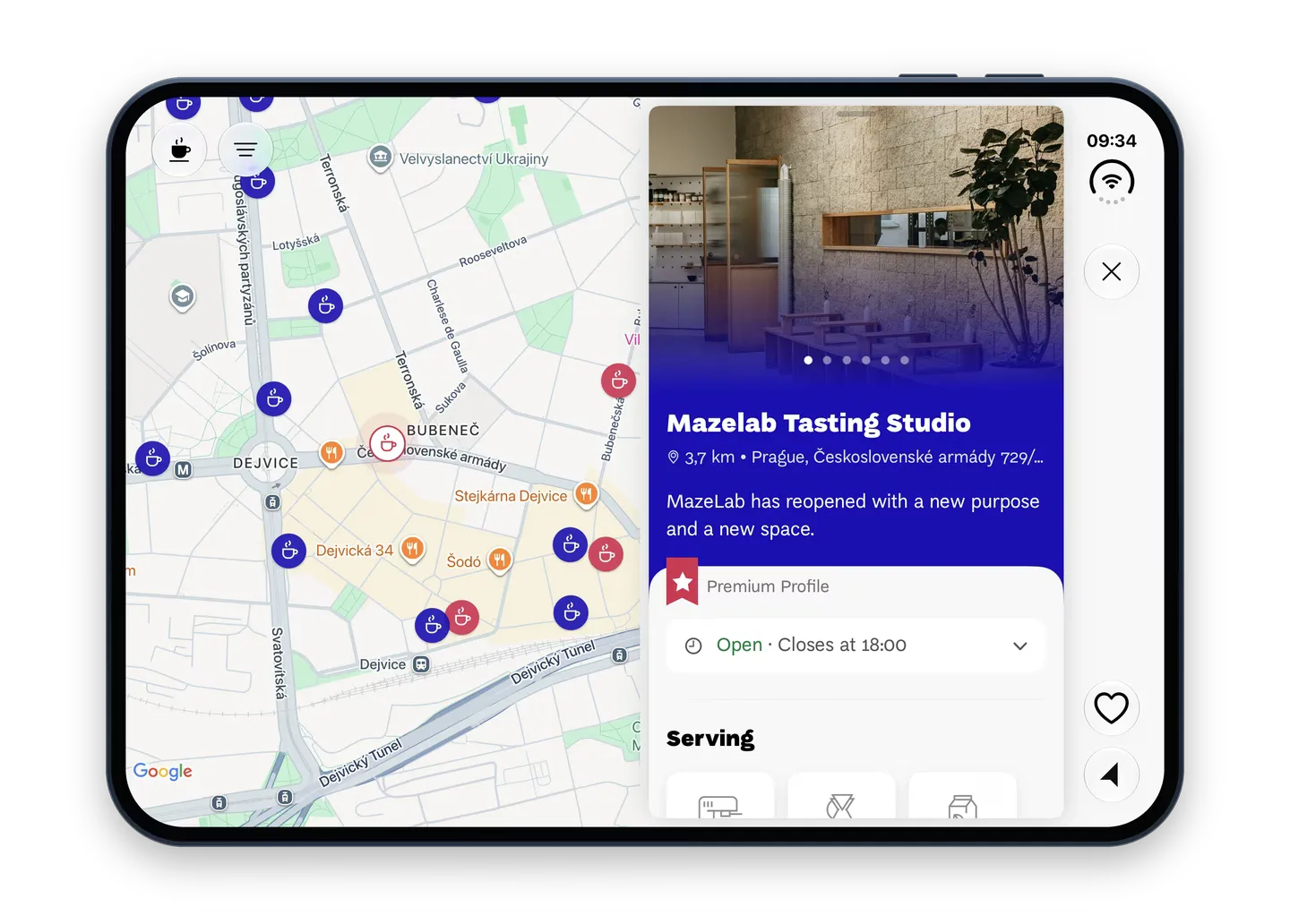
A bigger screen means more information at once. On a regular iPhone, ECT users switch between the map and a café’s detail. On the open iPhone Duo they see both: tap a pin on the map and the café’s detail opens on the right, while the map stays next to it and centres on that café.
Let your photos fill the screen
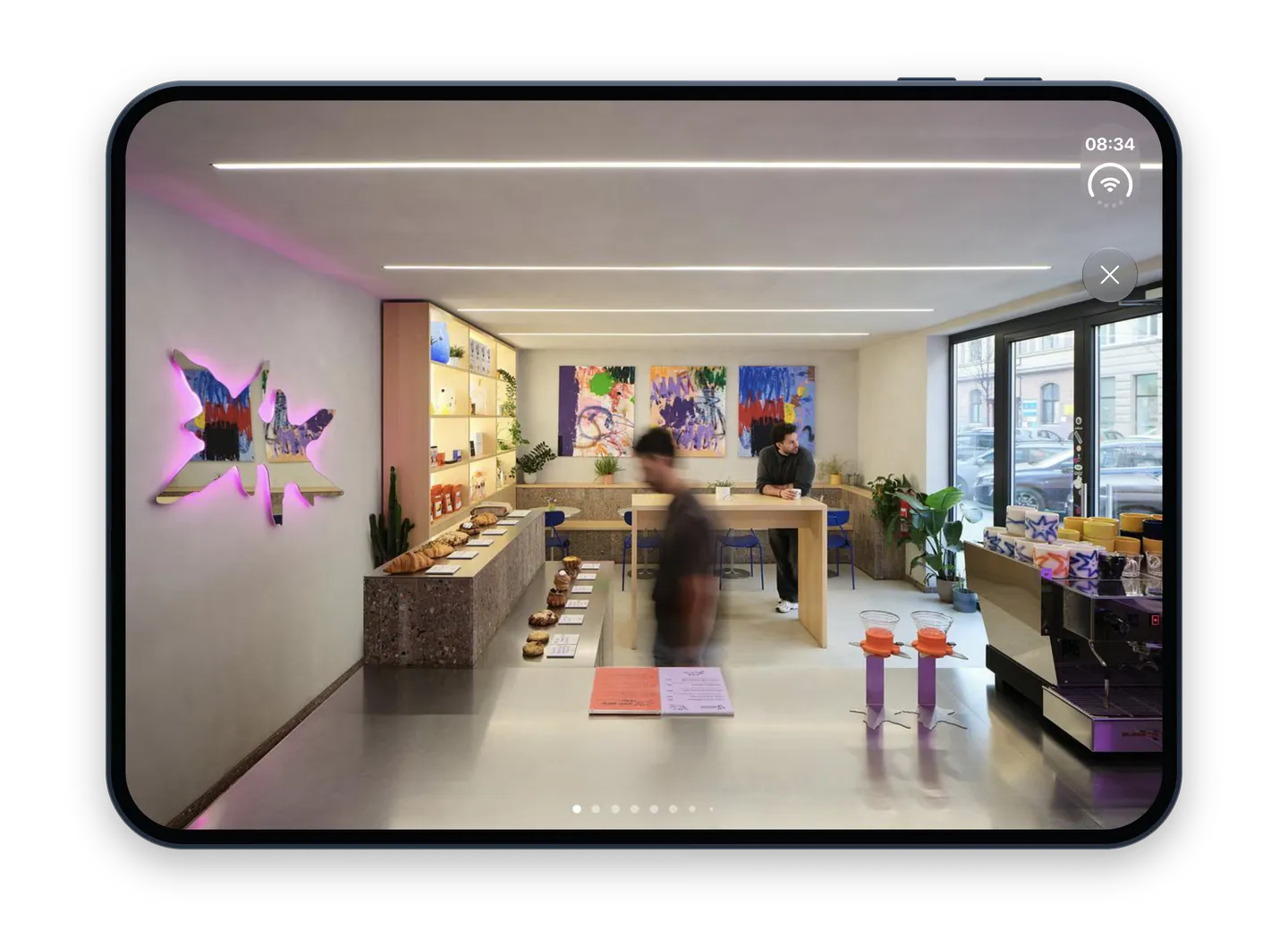
On the open iPhone Duo, photos are shown much bigger than on a regular iPhone, so every low-quality image is easy to spot. You need sharp photos, and your developers need to send each device the right size so the app still loads fast on mobile data.
Don’t forget the closed phone: check your custom menus
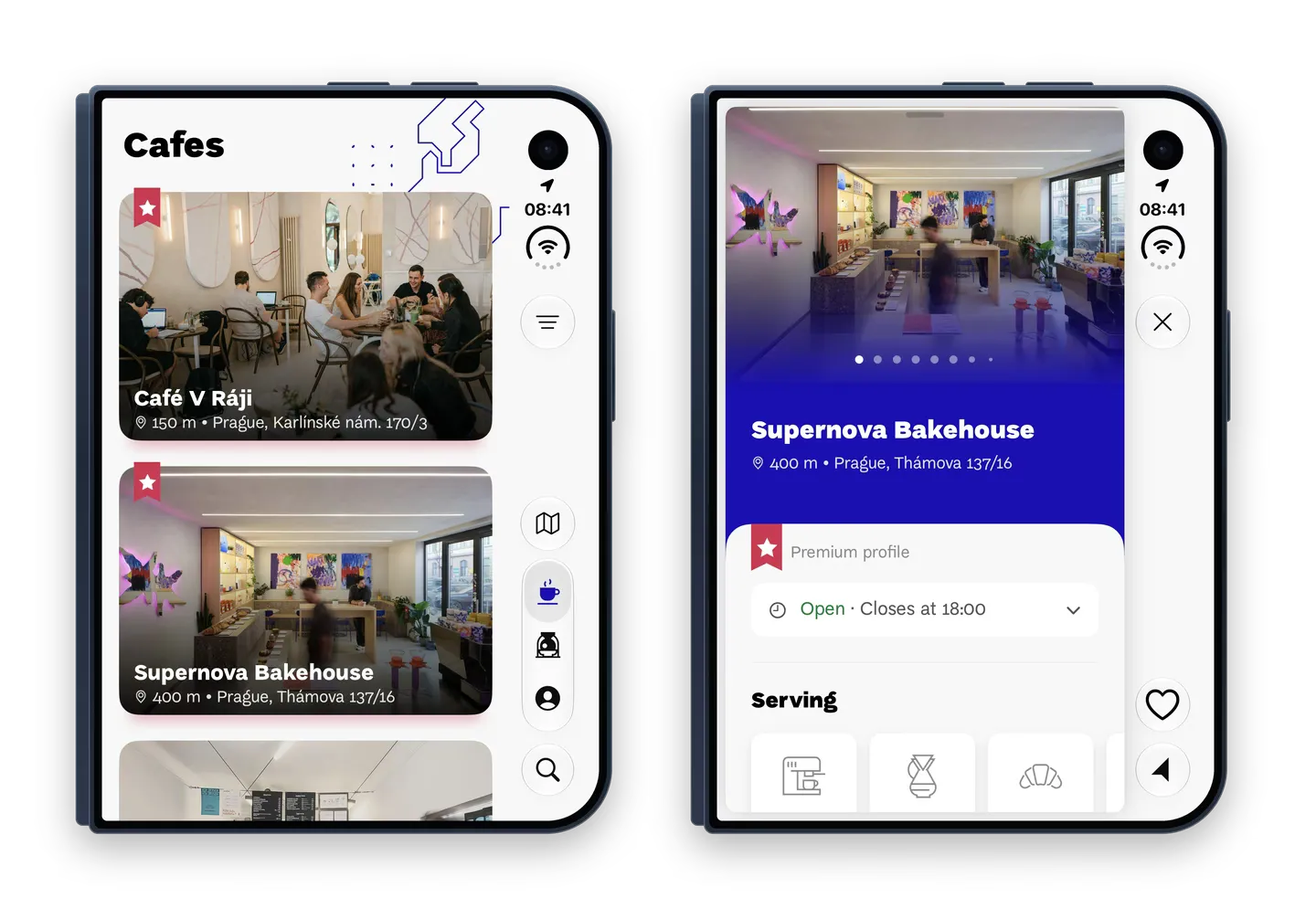
The outer screen of Duo is wider and shorter than a normal iPhone, and iOS moves the menu bars into a column on the right. Menus your developers built from scratch don’t move by themselves, so beware of that.
ECT moved its own filter and its list/map switch into that column. In a café’s detail, the same column holds the close, save and navigate buttons.
Is your app ready for iPhone Duo? What to do next
If your app already handles different screen sizes, it will most likely run on the Duo on day one. Apps designed for one fixed iPhone screen need more work.
An app that has not been updated yet still runs on iPhone Duo, but iOS shows it in the middle of the inner screen with empty space around it. This is how Apple’s own Apple Store app looked on our iPhone Duo in November 2026: nothing is broken, it just does not use the whole screen.
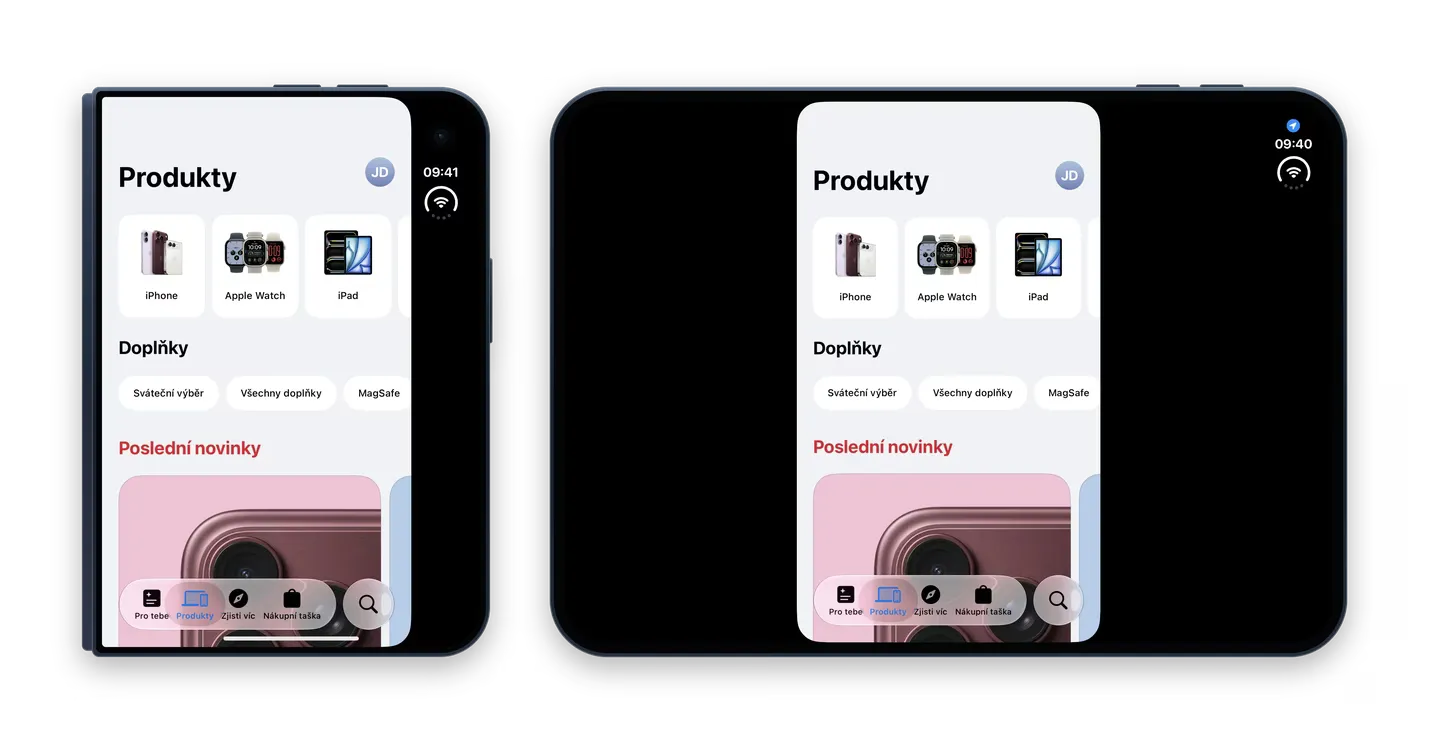
To change that, your developers have to rebuild it with Xcode 27.1 or newer (Xcode is Apple’s tool for building apps). After that, iOS resizes the app to fill the big inner screen, even if it only supports portrait, so fixed layouts can break or look like a stretched phone app.
Apple also gives developers a head start. Xcode 27.1 comes with a tool for AI coding assistants that scans the app’s code for the usual problems, such as fixed screen sizes, and suggests a fix for each. It finds what would break. It does not tell you what to show on the big screen.
5 things to check before you launch on iPhone Duo
- iPhone and iPad test: Does your app work well on both iPhone and iPad? If yes, it is probably ready.
- Fixed layouts: Is your app designed for one fixed iPhone screen, or portrait only? Once the app is rebuilt (see point 5), iOS will stretch it to fill the inner screen, so check that nothing breaks.
- Custom menus: Did your developers build menus from scratch? They don’t move to the side of the closed phone by themselves.
- Photos: Are your images sharp enough for the big screen, and does the app send each device the right size so it still loads fast on mobile data?
- Xcode: Is the app rebuilt with at least Xcode 27.1? Without that, iOS shows it in the middle of the inner screen with empty space around it.
Getting an app to run on iPhone Duo is not that difficult. The real challenge is figuring out what to serve to people on that big screen. If you struggle with that, we are happy to help and build a prototype for you. Just write to me at radek@cookielab.io.
FAQ
Do I have to redesign my app for iPhone Duo?
Usually not. If your app handles different screen sizes and uses Apple’s standard building blocks, it will most likely run on iPhone Duo from day one.
How can I quickly check if my app is ready?
See how it works on iPad as well as on iPhone. If it works well on both, you’re most probably fine.
Will my portrait-only app work on iPhone Duo?
It will run. Until it is rebuilt with Xcode 27.1 or newer, iOS shows it in the middle of the inner screen with empty space around it. After the rebuild, iOS resizes it to fill the big inner screen, so fixed layouts can break or look like a stretched phone app.
Do I need the latest Xcode?
To use the whole screen, yes: the app has to be rebuilt with Xcode 27.1 at least.
Why don't my custom menus move to the side of the closed phone?
iOS moves standard menu bars into a column on the right of the outer screen. Menus built from scratch don’t move by themselves, so developers need to adapt them.
